How to enable JVM metrics for Hbase
The custom metrics related to jvm ,memory, vmem, cpu, disk etc, can be enabled using cloudwatch agent and collectd services.
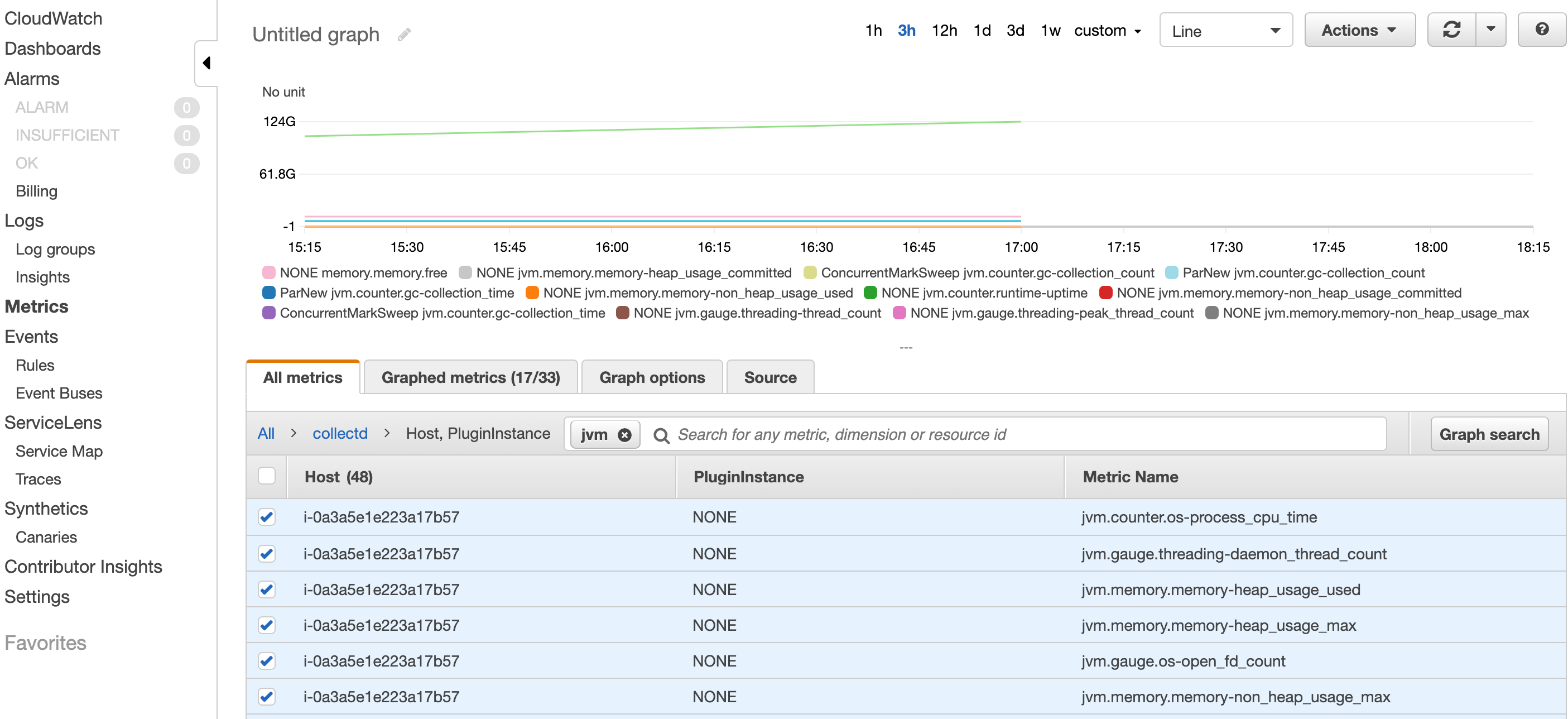
As of now EMR collects the metrics MemoryavailableMB and MemoryTotalMB which shows the memory allocated to yarn. Now say you want to collect JVM metrics such as jvm.memory.memory-heap_usage jvm.memory.memory-non_heap_usage counter.gc-collection_count jvm.counter.gc-collection_count
The custom metrics related to jvm ,memory, vmem, cpu, disk etc, can be enabled using cloudwatch agent and collectd services which collects huge number of metrics from an EC2 instance. You can use the following scripts to achieve your use case .
cloudWatch.sh
#!/bin/bash
##calling secondary bootstrap
sudo sed 's/null &/null \&\& hadoop fs -get s3:\/\/samplebucketforglue\/cloudwatch-agent\/jvmCustomMetric.sh \&\& sh \-x jvmCustomMetric.sh >> $STDOUT_LOG 2>> $STDERR_LOG \&\n/' /usr/share/aws/emr/node-provisioner/bin/provision-node > ~/provision-node.new
sudo cp ~/provision-node.new /usr/share/aws/emr/node-provisioner/bin/provision-node
The script cloudWatch.sh will be run as BootStrap action[1] and it will call the script jvmCustomMetric.sh during the application provisioning. Since the scripts involves changes from the hbase configurations it is necessary to use jvmCustomMetric.sh script during application provision which acts as a secondary bootstrap script.This is executed after all the applications are installed. You need to add this script location in the bootstrap action while creating the EMR cluster.
The script jvmCustomMetric.sh is where the actual things happen
jvmCustomMetric.sh
#!/bin/bash
sudo su << HERE
aws s3 cp s3://bucketname/path_to_file/amazon-cloudwatch-agent.rpm /home/hadoop/
yum localinstall /home/hadoop/amazon-cloudwatch-agent.rpm
aws s3 cp s3://bucketname/path_to_file/config.json /home/hadoop/
aws s3 cp s3://bucketname/path_to_file/setup.py /home/hadoop/
aws s3 cp s3://bucketname/path_to_file/hbase.config /home/hadoop/
aws s3 cp s3://bucketname/path_to_file/jmx.config /home/hadoop/
chmod 777 /home/hadoop/setup.py
mkdir -p /usr/share/collectd/
touch /usr/share/collectd/types.db
/opt/aws/amazon-cloudwatch-agent/bin/amazon-cloudwatch-agent-ctl -a fetch-config -m ec2 -c file:/home/hadoop/config.json -s

##installing collectd plugins
yum install -y collectd
yum install -y collectd-python
yum install -y collectd-java
yum install -y collectd-generic-jmx

printf "1\n1\n1\n1\n1\n1\n1\n1\n1\n2\n"| python /home/hadoop/setup.py
echo ".*" > /opt/collectd-plugins/cloudwatch/config/whitelist.conf
sed -i '/whitelist_pass_through/c\whitelist_pass_through = "True"' /opt/collectd-plugins/cloudwatch/config/plugin.conf
sed -i $'\/etc\/collectd.d/{e cat /home/hadoop/hbase.config \n}' /etc/collectd.conf

##enabling jmx on hbase
chmod 744 /etc/hbase/conf/hbase-env.sh
cat /home/hadoop/jmx.config >> /etc/hbase/conf/hbase-env.sh

##restarting hbase services
initctl stop hbase-thrift
initctl stop hbase-regionserver
initctl stop hbase-master
initctl start hbase-thrift
initctl start hbase-regionserver
initctl start hbase-master

##starting collectd and cloudwatch agent services
service collectd start
/opt/aws/amazon-cloudwatch-agent/bin/amazon-cloudwatch-agent-ctl -a stop
/opt/aws/amazon-cloudwatch-agent/bin/amazon-cloudwatch-agent-ctl -a fetch-config -m ec2 -c file:/home/hadoop/config.json -s
HERE
The script first downloads the required files from s3 to the local /home/hadoop directory.The amazon-cloudwatch-agent.rpm is the rpm file which is used to install the cloudwatch agent on the instances.This file is downloaded from the s3 link 'https://s3.amazonaws.com/amazoncloudwatch-agent/amazon_linux/amd64/latest/amazon-cloudwatch-agent.rpm'.
The other files config.json,setup.py , hbase.config, jmx.config are the configuration files which will be used later in the script. These files has to be present in your bucket location before starting the EMR cluster with this bootstrap action. You can download these files from my public GitHub repo .
Then the script installs plugins related to collects in order to fetch the metrics related to java,genericjmx and python.There are lot of plugins available in the collectd which can be installed and configured to collect more number metrics from collectd. Cloudwatch supports all the metrics reported from the collectd which is a opensource metric collector for linux systems.For more details on all the collectd metrics refer the link [3]
For collectd to send metrics to cloudwatch, we need to install collectd-cloudwatch plugin which is coded in the setup.py file. It asks for few questions for which I am giving the default options through printf command.If you wanted to give a different input ,you can change the numbers in the printf command accordingly.
Then I hjave changed some of the configurations related to collectd-cloudwatch plugin reagarding what metrics needs to be sent from collectd to cloudwatch. You need to add those metric names in the whitelist.conf file so that only those metrics will be sent. Here I have enabled collectd to send all the metrics by passing the '.*' regex and enabling the whitelist_pass_through configuration from plugin.conf. Also remember that sending all the metrics to cloudwatch incurs cost based on the metrics collected so choose the metrics pertaining to your use case.For more details on this plugin refer the link [4]
Then I have used the hbase.config to add the jmx plugin related configurations to collectd.conf file. This plugin uses the jars collectd-api and generic-jmx for collected the jmx related metrics from master and region servers. Some of the metrics include jvm.memory.memory-non_heap_usage_max,jvm.memory.memory-heap_usage_committed,jvm.counter.gc-collection_count,jvm.counter.gc-collection_count and jvm.counter.gc-collection_time. For the complete list of metrics collected refer the hbase.config file. collectd uses Mbeans class to collect all the metrics.
Next the script enables the jmx in hbase-env.sh file. By default it will be disabled.I am exporting jmx related properties on HBASE_MASTER_OPTS, HBASE_REGIONSERVER_OPTS and HBASE_THRIFT_OPTS.It enables jmx metrics on ports 10101,10102 and 10103 respectively.This configurations is passed in the jmx.config files and can be modified according to your requirements.
Finally the script restarts all the hbase related servers, collectd and cloudwatch agent.
I have made this script to collect jvm related metrics on hbase. This can also be used on other applications but the jmx metrics has to be enabled. Here are some of the list of plugins related to specific applications which can be used to collect the jvm metrics.[5]
The cloudwatch agent also collects some of the metrics related to cpu, disk, diskio, mem and swap.This can be enabled or disabled in the config.json file. Please note that the following configurations is required to enable the collectd metrics on cloudwatch agent under the metrics_collected json key.
"collectd": {
 "metrics_aggregation_interval": 0
    },
The blog [6] also helps in setting up the collectd with cloudwatch agent.Now you should be able to see jvm metrics on cloudwatch for EMR instances.